

This post is part of an ongoing series - see all the posts below.
In the previous part, we built an OSPF network from scratch using Ansible, and then logged in to the routers to check that everything was working. We looked at the OSPF neighbors, checked the routing table, and ran a few pings. That's fine for six routers. But imagine doing it for fifty, before and after every change, at 2 AM during a maintenance window. By router number twelve, you're not really reading the output anymore, you're just looking for the word FULL and hoping for the best.
In this part, we'll let Ansible do the checking for us. We'll write a few simple tests that check whether every router has the right number of OSPF neighbors, and whether every router can reach every other router. If something is wrong, the playbook fails and tells us exactly where the problem is. We'll also break the network on purpose, so we can see what happens when a check fails.
We're continuing with the same lab and project from the previous part, so if you haven't read it yet, I recommend starting there.
What Is assert?
assert is a built-in Ansible module that checks whether something is true. You give it one or more conditions, and if they're all true, the task passes. If any of them is false, the task fails.
Here's what it looks like.
- name: Check something
  ansible.builtin.assert:
    that:
      - some_value == 4
    fail_msg: "The value is not 4"
    success_msg: "The value is 4"
- that - A list of conditions to check. They're written the same way as the conditions we used with
whenin the conditionals part, so things like==,!=, andis definedall work here. If you have more than one condition, all of them need to be true for the task to pass. - fail_msg - The message to show if the check fails.
- success_msg - The message to show if the check passes.
fail_msg and success_msg are optional, but I always add them. Without them, Ansible only tells you that an assertion failed, and you have to work out what it means yourself.
assert doesn't connect to any devices or change anything. It only looks at data Ansible already has, such as variables, facts, or the output of a previous task. So the usual pattern is to collect some information from the device first, such as the output of a show command, and then use assert to check it.
This makes it really useful in network automation. Some common examples are:
- Checking the state of the network - Such as whether all the OSPF or BGP neighbors are up, or all the uplinks are connected.
- Checking before and after a change - Making sure the network is healthy before you change anything, and that it's still healthy afterwards.
- Checking your data - Making sure a variable is defined or has a valid value, before using it to configure a device.
In this part, we'll focus on the first two.
A Simple Example
Before we use assert with our routers, let's start with a simple example that doesn't need any devices at all. Create a new playbook called assert_example.yml.
---
- name: assert example
  hosts: localhost
  gather_facts: false

  vars:
    hostname: r1
    ntp_servers:
      - 10.10.10.13
      - 10.10.10.14

  tasks:
    - name: Check the hostname
      ansible.builtin.assert:
        that:
          - hostname is defined
          - hostname | length > 0
        fail_msg: "The hostname is missing"
        success_msg: "The hostname is {{ hostname }}"

    - name: Check the number of NTP servers
      ansible.builtin.assert:
        that:
          - ntp_servers | length == 2
        fail_msg: "Expected 2 NTP servers, found {{ ntp_servers | length }}"
        success_msg: "Found 2 NTP servers"
We're using localhost, so nothing is sent to any device, and we have two variables to check, hostname and ntp_servers.
- Check the hostname - This task has two conditions. The first one checks that
hostnameis defined, and the second checks that it isn't empty, using thelengthfilter. Both need to be true for the task to pass. - Check the number of NTP servers - This task checks that there are exactly two NTP servers in the list.
Let's run the playbook.
ansible-playbook assert_example.yml
PLAY [assert example] ****************************

TASK [Check the hostname] ************************
ok: [localhost] => {
  "changed": false,
  "msg": "The hostname is r1"
}

TASK [Check the number of NTP servers] ***********
ok: [localhost] => {
  "changed": false,
  "msg": "Found 2 NTP servers"
}

PLAY RECAP ***************************************
localhost : ok=2 changed=0 unreachable=0 failed=0 skipped=0 rescued=0 ignored=0
Both checks passed, so both tasks show ok, along with the success_msg we defined.
Now, let's see what happens when a check fails. Remove 10.10.10.14 from the ntp_servers list, so there's only one NTP server, and run the playbook again.
PLAY [assert example] ****************************

TASK [Check the hostname] ************************
ok: [localhost] => {
  "changed": false,
  "msg": "The hostname is r1"
}

TASK [Check the number of NTP servers] ***********
[ERROR]: Task failed: Action failed: Expected 2
NTP servers, found 1
Origin: .../assert_example.yml:20:7

20     - name: Check the number of NTP servers
         ^ column 7

fatal: [localhost]: FAILED! => {
  "assertion": "ntp_servers | length == 2",
  "changed": false,
  "evaluated_to": false,
  "msg": "Expected 2 NTP servers, found 1"
}

PLAY RECAP ***************************************
localhost : ok=1 changed=0 unreachable=0 failed=1 skipped=0 rescued=0 ignored=0
The hostname check still passes, but the NTP check fails, and the PLAY RECAP shows failed=1. Ansible gives us quite a bit of information about the failure.
- The error message - Shows our
fail_msg,Expected 2 NTP servers, found 1, so we know exactly what's wrong. - Origin - Shows the exact file and line in the playbook where the failing task is. This is really handy in larger playbooks.
- assertion - The condition that failed,
ntp_servers | length == 2. - evaluated_to - The result of the condition, which was
false.
This is the basic idea behind every check we'll write in this post. We collect some information, write a condition that should be true, and let assert tell us if it isn't.
Checking OSPF Neighbors
Now let's write a real check for our network. The first thing I'd usually check on an OSPF network is whether every router has all the neighbors it should have. If a link goes down, or a neighbor gets stuck, the number of neighbors drops, so it's a quick way to spot a problem.
The question is, how do we know how many neighbors each router should have? We could hardcode the numbers, but there's a better way. In the previous part, we described every router's interfaces in host_vars, and every interface that isn't passive should have exactly one OSPF neighbor. So the expected number of neighbors is simply the number of non-passive interfaces in host_vars. We already have this information, so there's no need to store it anywhere else.
Of course, this won’t work for every scenario. For example, a multi-access segment with several routers on it would have more than one neighbour per interface. So depending on your topology, you may need to adjust the logic to suit your environment.
Create a new playbook called validate_ospf.yml.
---
- name: Validate OSPF
  hosts: routers
  gather_facts: false

  tasks:
    - name: Get OSPF neighbors
      cisco.ios.ios_command:
        commands:
          - show ip ospf neighbor
      register: ospf_output

    - name: Count the expected and actual neighbors
      ansible.builtin.set_fact:
        expected_neighbors: "{{ interfaces | rejectattr('passive') | list | length }}"
        actual_neighbors: "{{ ospf_output.stdout_lines[0] | select('search', 'FULL') | list | length }}"

    - name: Check the number of OSPF neighbors
      ansible.builtin.assert:
        that:
          - actual_neighbors | int == expected_neighbors | int
        fail_msg: "{{ inventory_hostname }} has {{ actual_neighbors }} OSPF neighbors, expected {{ expected_neighbors }}"
        success_msg: "{{ inventory_hostname }} has {{ actual_neighbors }} of {{ expected_neighbors }} OSPF neighbors"
The playbook has three tasks, following the same pattern we used in the simple example. Collect the information, work out what we need from it, and then check it.
Getting the Neighbors
The first task runs show ip ospf neighbor on every router, and saves the output in a variable called ospf_output. We've used ios_command with register plenty of times in the series, so there's nothing new here.
Counting the Neighbors
The second task uses set_fact to create two new variables.
expected_neighbors: "{{ interfaces | rejectattr('passive') | list | length }}"
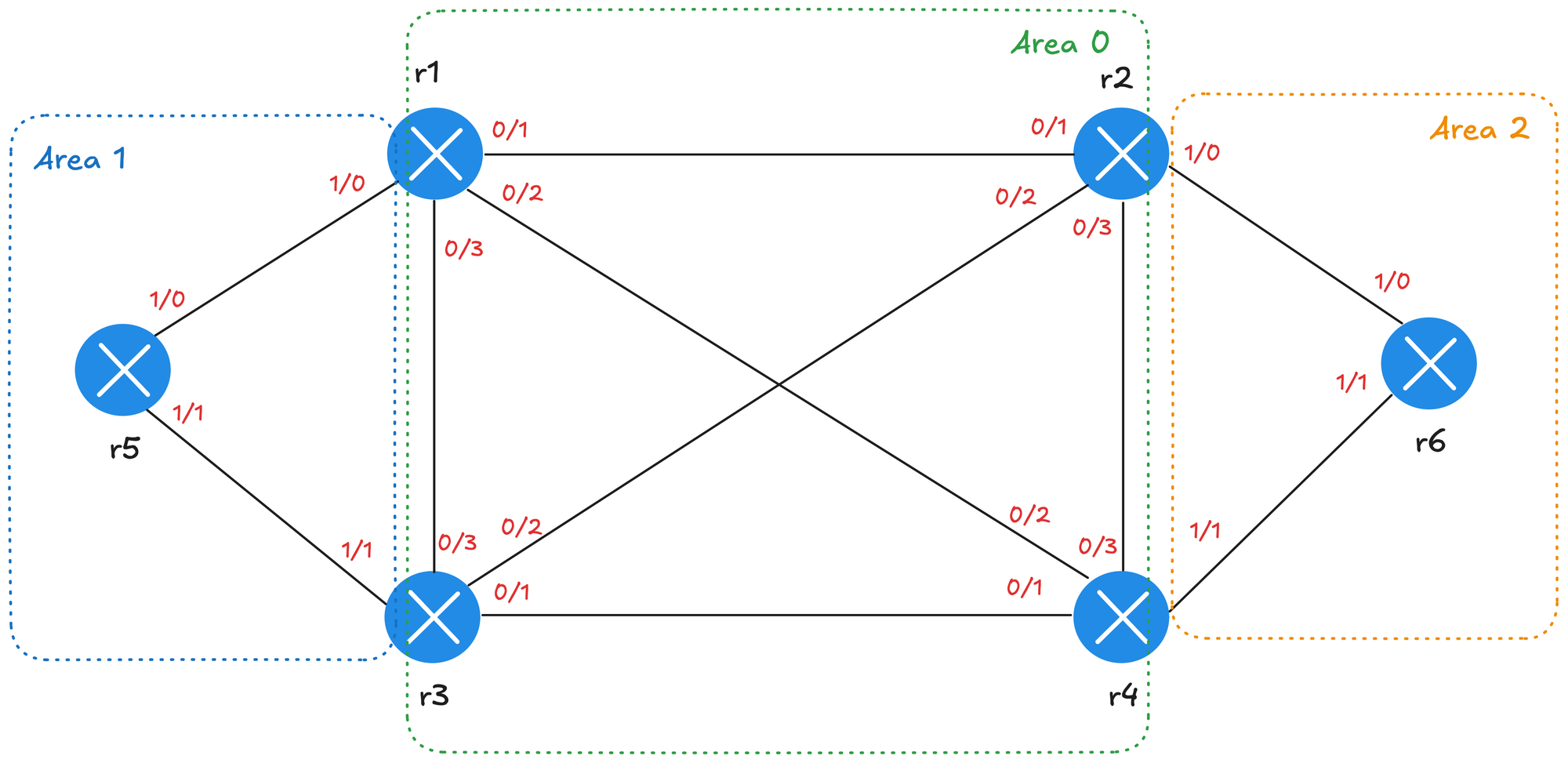
expected_neighbors starts with the interfaces list from host_vars. rejectattr('passive') removes every interface where passive is true, which leaves us with the links. Then length counts them. For r1, that's four links, since we don't count the two loopbacks.
actual_neighbors: "{{ ospf_output.stdout_lines[0] | select('search', 'FULL') | list | length }}"
actual_neighbors starts with the output of show ip ospf neighbor. stdout_lines[0] gives us the output as a list of lines, where each neighbor is on its own line. The select filter keeps only the lines that pass a test, and search is a test that checks whether a line contains a certain piece of text. So select('search', 'FULL') keeps only the neighbors in the FULL state, and length counts them.
select works in a similar way to selectattr, which we used in the filters part. The difference is that selectattr checks a key inside each dictionary, while select checks the items themselves, which in our case are lines of text.
Remember, variables created withset_factbelong to the device they were created for. So each router gets its ownexpected_neighborsandactual_neighbors, based on its ownhost_varsand its ownshow ip ospf neighboroutput. For example,r1ends up with4for both, whiler5ends up with2.
Checking the Neighbors
The last task uses assert to compare the two numbers. If they're the same, the router has all the neighbors it should have, and the task passes. If they're different, it fails.
You might notice the | int on both sides of the condition. Depending on the version of Ansible, values created with set_fact can sometimes end up as strings rather than numbers. Adding int makes sure we're always comparing two numbers.
We've also included the router name and the two numbers in both messages, so we can see exactly what's going on for each router. As a quick reminder, inventory_hostname is a built-in Ansible variable that holds the name of the current host as it appears in the inventory.
Running the Check
Let's run the playbook.
ansible-playbook validate_ospf.yml
PLAY [Validate OSPF] *****************************

TASK [Get OSPF neighbors] ************************
ok: [r2]
ok: [r5]
ok: [r3]
ok: [r4]
ok: [r1]
ok: [r6]

TASK [Count the expected and actual neighbors] ***
ok: [r1]
ok: [r3]
ok: [r2]
ok: [r4]
ok: [r5]
ok: [r6]

TASK [Check the number of OSPF neighbors] ********
ok: [r1] => {
  "changed": false,
  "msg": "r1 has 4 of 4 OSPF neighbors"
}
ok: [r2] => {
  "changed": false,
  "msg": "r2 has 4 of 4 OSPF neighbors"
}
ok: [r4] => {
  "changed": false,
  "msg": "r4 has 4 of 4 OSPF neighbors"
}
ok: [r3] => {
  "changed": false,
  "msg": "r3 has 4 of 4 OSPF neighbors"
}
ok: [r5] => {
  "changed": false,
  "msg": "r5 has 2 of 2 OSPF neighbors"
}
ok: [r6] => {
  "changed": false,
  "msg": "r6 has 2 of 2 OSPF neighbors"
}

PLAY RECAP ***************************************
r1 : ok=3 changed=0 unreachable=0 failed=0 skipped=0 rescued=0 ignored=0
r2 : ok=3 changed=0 unreachable=0 failed=0 skipped=0 rescued=0 ignored=0
r3 : ok=3 changed=0 unreachable=0 failed=0 skipped=0 rescued=0 ignored=0
r4 : ok=3 changed=0 unreachable=0 failed=0 skipped=0 rescued=0 ignored=0
r5 : ok=3 changed=0 unreachable=0 failed=0 skipped=0 rescued=0 ignored=0
r6 : ok=3 changed=0 unreachable=0 failed=0 skipped=0 rescued=0 ignored=0
All six routers passed. The four routers in area 0 have four neighbors each, and r5 and r6 have two each, which matches the diagram. Instead of logging in to six routers and reading through show ip ospf neighbor on each one, we got the answer in a few seconds.
Breaking Something on Purpose
A check that always passes isn't very useful unless we know it'll fail when something goes wrong. So let's break the network on purpose. On r1, let's shut down Ethernet0/1, which is the link to r2.